


1.コピーコマンド
戻るCopyCommand
この画面の使い方は、「コピー元」に入力をして、「CopyCommand」ボタンをクリックしますと、「コピー先」にコピーされます。画面は下記の通りです。
CopyCommand
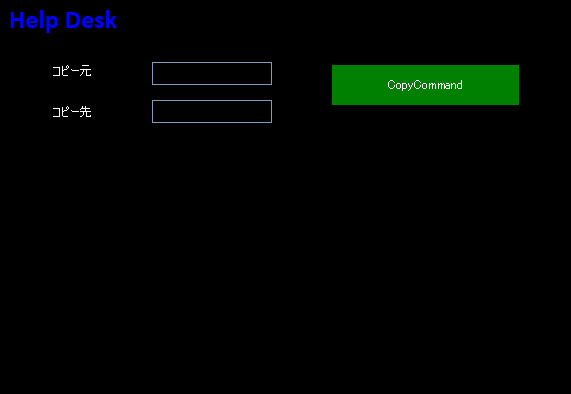
クリックすると拡大します
ZAMLは下記の通りです。
16~23行目は、WindowChromeのShellの宣言
25~32行目は、WindowのResourceの宣言
38~70行目は、InteractionTriggerの宣言
75~98行目は、WindowChromeの描画
111~113行目は、コピー元の宣言
115~117行目は、コピー先の宣言
119~120行目は、Buttonの宣言
※ButtonのStyle="{StaticResource CommandTemplate}" Foreground="White" は自分の
作成内容によって違えて下さい。
View
<ccl:CustomChromeWindow
        x:Class="LivetWPFChromeSupportDesk1.Views.Window8"
        xmlns="http://schemas.microsoft.com/winfx/2006/xaml/presentation"
        xmlns:x="http://schemas.microsoft.com/winfx/2006/xaml"
        xmlns:shell="http://schemas.microsoft.com/winfx/2006/xaml/presentation/shell"
        xmlns:ccl="clr-namespace:CustomChromeLibrary;assembly=CustomChromeLibrary"
        xmlns:i="http://schemas.microsoft.com/expression/2010/interactivity"
        xmlns:ei="http://schemas.microsoft.com/expression/2010/interactions"
        xmlns:l="http://schemas.livet-mvvm.net/2011/wpf"
        xmlns:core="clr-namespace:Microsoft.Expression.Interactivity.Core;assembly=Microsoft.Expression.Interactions"
        xmlns:v="clr-namespace:LivetWPFChromeSupportDesk1.Views"
        xmlns:vm="clr-namespace:LivetWPFChromeSupportDesk1.ViewModels"
        WindowStartupLocation="CenterScreen"
        Title="Window8" Height="714" Width="1035">

    <shell:WindowChrome.WindowChrome>
        <shell:WindowChrome
            ResizeBorderThickness="6"
            CaptionHeight="43"
            CornerRadius="0,0,0,0"
            GlassFrameThickness="0">
        </shell:WindowChrome>
    </shell:WindowChrome.WindowChrome>

    <Window.Resources>
        <ResourceDictionary>
            <vm:CaptionButtonRectToMarginConverter x:Key="CaptionButtonMarginConverter"/>
            <ResourceDictionary.MergedDictionaries>
                <ResourceDictionary Source="/Resources/Styles2.xaml"/>
            </ResourceDictionary.MergedDictionaries>
        </ResourceDictionary>
    </Window.Resources>

    <Window.DataContext>
        <vm:ViewModel8/>
    </Window.DataContext>

    <i:Interaction.Triggers>
        <!--WindowのContentRenderedイベントのタイミングでViewModelのInitializeメソッドが呼ばれます-->
        <i:EventTrigger EventName="ContentRendered">
            <l:LivetCallMethodAction MethodTarget="{Binding}" MethodName="Initialize"/>
        </i:EventTrigger>

        <l:InteractionMessageTrigger
            MessageKey="MessageKey2" Messenger="{Binding Messenger}">
            <l:TransitionInteractionMessageAction
                WindowType="{x:Type v:Window2}" Mode="Modal"/>
        </l:InteractionMessageTrigger>

        <l:InteractionMessageTrigger
            MessageKey="MessageKey10" Messenger="{Binding Messenger}">
            <l:TransitionInteractionMessageAction
                WindowType="{x:Type v:Window10}" Mode="Modal"/>
        </l:InteractionMessageTrigger>

        <!-- 下記がないと、タスクバーが1つにならない -->
        <i:EventTrigger EventName="Loaded">
            <i:InvokeCommandAction Command="{Binding Path=Loaded}"
                                   CommandParameter="{Binding Mode=OneTime,RelativeSource={RelativeSource Mode=FindAncestor,AncestorType={x:Type Window}}}"/>
        </i:EventTrigger>

        <i:EventTrigger EventName="Closing">
            <i:InvokeCommandAction Command="{Binding Path=Closing}"
                                   CommandParameter="{Binding Mode=OneTime,RelativeSource={RelativeSource Mode=FindAncestor,AncestorType={x:Type Window}}}"/>
        </i:EventTrigger>

        <l:InteractionMessageTrigger MessageKey="Close" Messenger="{Binding Messenger}">
            <l:WindowInteractionMessageAction/>
        </l:InteractionMessageTrigger>
    </i:Interaction.Triggers>

    <!-- Grid-1 -->
    <Grid>

        <!-- WindowChrome Start  -->
        <Border  Grid.RowSpan="2" BorderThickness="3" BorderBrush="Black">
            <Border.Background>
                <LinearGradientBrush StartPoint="0.5,0" EndPoint="0.5,1">
                    <GradientStop Color="Black" Offset="0" />
                    <GradientStop Color="Black" Offset="1" />
                </LinearGradientBrush>
            </Border.Background>
        </Border>

        <Border  BorderThickness="3,3,3,1" BorderBrush="Black" Margin="{Binding Path=CaptionButtonMargin}">
            <Border.Background>
                <LinearGradientBrush StartPoint="0.5,0" EndPoint="0.5,1">
                    <GradientStop Color="Black" Offset="0" />
                    <GradientStop Color="Black" Offset="1" />
                </LinearGradientBrush>
            </Border.Background>
            <!--Window Icon and Title-->
            <StackPanel Orientation="Horizontal" Margin="0" VerticalAlignment="Top">
                <TextBlock Text=" Help Desk" FontFamily="Calibri" FontWeight="Bold" FontSize="26" Foreground="Blue" />
            </StackPanel>
        </Border>
        <ccl:CaptionButtons />
        <!-- WindowChrome End  -->

        <!-- Grid-2 -->
        <!--Content-->
        <Grid Grid.Row="1">

            <!-- ★★★ -->
            <Grid>
                <TextBox Text="{Binding Path=txt本日}" TextAlignment="Center"
                    Foreground="White" Background="Black"
                    Height="17" HorizontalAlignment="Center"  Name="txt本日"
                    VerticalAlignment="Top" Width="81" Margin="809,3,123,0" />

                <Label   Content="コピー元" Foreground="White" Height="22" HorizontalAlignment="Left" Margin="48,60,0,0" Name="label1" VerticalAlignment="Top" Width="106" />
                <TextBox Text="{Binding Path=txtCopy1, Mode=TwoWay}" Background="Black" Foreground="White" Height="23" HorizontalAlignment="Left"
                 Margin="152,62,0,0" Name="textBox2" VerticalAlignment="Top" Width="120" />

                <Label   Content="コピー先" Foreground="White" Height="22" HorizontalAlignment="Left" Margin="48,101,0,0" Name="label2" VerticalAlignment="Top" Width="106" />
                <TextBox Text="{Binding Path=txtCopy2, Mode=TwoWay}" Background="Black" Foreground="White" Height="23" HorizontalAlignment="Left"
                 Margin="152,100,0,0" Name="textBox3" VerticalAlignment="Top" Width="120" />

                <Button Command="{Binding CopyCommand1}"  Style="{StaticResource CommandTemplate}" Foreground="White"
                Content="CopyCommand" Height="40" HorizontalAlignment="Left" Margin="332,65,0,0" Name="button16" VerticalAlignment="Top" Width="187" />

            </Grid>
            <!-- ★★★ -->

        </Grid>
    </Grid>
</ccl:CustomChromeWindow>
ViewModelは下記の通りです。
ViewModel【抜粋】
class ViewModel8 : ViewModel
    {
        #region 変更通知プロパティ
        //-----------------------------------------------
        public string txt本日 { get; set; }
         public string txtCopy1 { get; set; }
        //
        private string _txtCopy2;
        public string txtCopy2
        {
            get { return _txtCopy2; }
            set
            {
                _txtCopy2 = value;
                RaisePropertyChanged("txtCopy2");
            }
        }
        //-----------------------------------------------
        #endregion

        #region CopyCommand1
        //-----------------------------------------------------
        /// <summary>
        /// Copy処理のコマンドを定義します。
        /// </summary>
        private ViewModelCommand _copyCommand1;
        public ViewModelCommand CopyCommand1
        {
            get
            {
                if (this._copyCommand1 == null)
                {
                    this._copyCommand1 = new ViewModelCommand(CopyExecute,
                    		CanCopyExecute);
                }
                return this._copyCommand1;
            }
        }
        /// <summary>
        /// Copy処理が実行可能かどうかの判定を行います。
        /// </summary>
        private bool CanCopyExecute()
        {
            return true;
        }
        /// <summary>
        /// Copy処理のコマンドの実行を行います。
        /// </summary>
        private void CopyExecute()
        {
            txtCopy2 = txtCopy1;
        }
        //--------------------------------------------------
        #endregion