


2.確認付き閉じるボタン
戻るCheckedAndClose
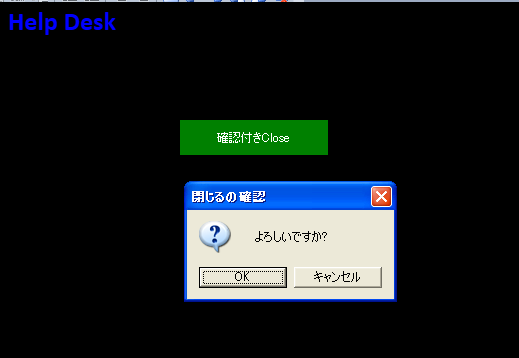
閉じる為のボタンをクリックしますと、確認画面が表示されて、OKすると閉じる機能です。画面は下記の通りです。
CheckedAndClose
クリックすると拡大します
100~112行目がButtonの定義です。コマンド(CallbackMethodName)の名称はCheckedAndCloseです。
View
<ccl:CustomChromeWindow
        x:Class="LivetWPFChromeHelpDesk1.Views.Window6"
        xmlns="http://schemas.microsoft.com/winfx/2006/xaml/presentation"
        xmlns:x="http://schemas.microsoft.com/winfx/2006/xaml"
        xmlns:shell="http://schemas.microsoft.com/winfx/2006/xaml/presentation/shell"
        xmlns:ccl="clr-namespace:CustomChromeLibrary;assembly=CustomChromeLibrary"
        xmlns:i="http://schemas.microsoft.com/expression/2010/interactivity"
        xmlns:ei="http://schemas.microsoft.com/expression/2010/interactions"
        xmlns:l="http://schemas.livet-mvvm.net/2011/wpf"
        xmlns:core="clr-namespace:Microsoft.Expression.Interactivity.Core;assembly=Microsoft.Expression.Interactions"
        xmlns:v="clr-namespace:LivetWPFChromeHelpDesk1.Views"
        xmlns:vm="clr-namespace:LivetWPFChromeHelpDesk1.ViewModels"
        WindowStartupLocation="CenterScreen"
        Title="Window6" Height="714" Width="1035">

    <shell:WindowChrome.WindowChrome>
        <shell:WindowChrome
            ResizeBorderThickness="6"
            CaptionHeight="43"
            CornerRadius="0,0,0,0"
            GlassFrameThickness="0">
        </shell:WindowChrome>
    </shell:WindowChrome.WindowChrome>

    <Window.Resources>
        <ResourceDictionary>
            <vm:CaptionButtonRectToMarginConverter x:Key="CaptionButtonMarginConverter"/>
            <ResourceDictionary.MergedDictionaries>
                <ResourceDictionary Source="/Resources/Styles2.xaml"/>
            </ResourceDictionary.MergedDictionaries>
        </ResourceDictionary>
    </Window.Resources>

    <Window.DataContext>
        <vm:ViewModel6/>
    </Window.DataContext>

    <i:Interaction.Triggers>
        <!--WindowのContentRenderedイベントのタイミングでViewModelのInitializeメソッドが呼ばれます-->
        <i:EventTrigger EventName="ContentRendered">
            <l:LivetCallMethodAction MethodTarget="{Binding}" MethodName="Initialize"/>
        </i:EventTrigger>

        <!-- 下記がないと、タスクバーが1つにならない -->
        <i:EventTrigger EventName="Loaded">
            <i:InvokeCommandAction Command="{Binding Path=Loaded}"
                                   CommandParameter="{Binding Mode=OneTime,RelativeSource={RelativeSource Mode=FindAncestor,AncestorType={x:Type Window}}}"/>
        </i:EventTrigger>

        <i:EventTrigger EventName="Closing">
            <i:InvokeCommandAction Command="{Binding Path=Closing}"
                                   CommandParameter="{Binding Mode=OneTime,RelativeSource={RelativeSource Mode=FindAncestor,AncestorType={x:Type Window}}}"/>
        </i:EventTrigger>

        <l:InteractionMessageTrigger MessageKey="Close" Messenger="{Binding Messenger}">
            <l:WindowInteractionMessageAction/>
        </l:InteractionMessageTrigger>

    </i:Interaction.Triggers>

    <!-- Grid-1 -->
    <Grid>

        <!-- WindowChrome Start  -->
        <Border  Grid.RowSpan="2" BorderThickness="3" BorderBrush="Black">
            <Border.Background>
                <LinearGradientBrush StartPoint="0.5,0" EndPoint="0.5,1">
                    <GradientStop Color="Black" Offset="0" />
                    <GradientStop Color="Black" Offset="1" />
                </LinearGradientBrush>
            </Border.Background>
        </Border>

        <Border  BorderThickness="3,3,3,1" BorderBrush="Black" Margin="{Binding Path=CaptionButtonMargin}">
            <Border.Background>
                <LinearGradientBrush StartPoint="0.5,0" EndPoint="0.5,1">
                    <GradientStop Color="Black" Offset="0" />
                    <GradientStop Color="Black" Offset="1" />
                </LinearGradientBrush>
            </Border.Background>
            <!--Window Icon and Title-->
            <StackPanel Orientation="Horizontal" Margin="0" VerticalAlignment="Top">
                <TextBlock Text=" Help Desk" FontFamily="Calibri" FontWeight="Bold" FontSize="26" Foreground="Blue" />
            </StackPanel>
        </Border>
        <ccl:CaptionButtons />
        <!-- WindowChrome End  -->

        <!-- Grid-2 -->
        <!--Content-->
        <Grid Grid.Row="1">

            <!-- ★★★ -->
            <Grid>
                <TextBox Text="{Binding Path=txt本日}" TextAlignment="Center"
                    Foreground="White" Background="Black"
                    Height="17" HorizontalAlignment="Center"  Name="txt本日"
                    VerticalAlignment="Top" Width="81" Margin="809,3,123,0" />

                <Button Foreground="White" Style="{StaticResource CommandTemplate}"
                        Content="確認付きClose" Margin="45,0,706,561" Height="35"
                        VerticalAlignment="Bottom" HorizontalAlignment="Right" Width="148">
                    <i:Interaction.Triggers>
                        <i:EventTrigger EventName="Click">
                            <l:ConfirmationDialogInteractionMessageAction>
                                <l:DirectInteractionMessage CallbackMethodName="CheckedAndClose" CallbackMethodTarget="{Binding}">
                                    <l:ConfirmationMessage Image="Question" Caption="閉じるの確認" Text="よろしいですか?"/>
                                </l:DirectInteractionMessage>
                            </l:ConfirmationDialogInteractionMessageAction>
                        </i:EventTrigger>
                    </i:Interaction.Triggers>
                </Button>


            </Grid>
            <!-- ★★★ -->

        </Grid>
    </Grid>
</ccl:CustomChromeWindow>
68~75行目がCheckedAndCloseメソッドです。
ViewModel
using System;
using System.Collections.Generic;
using System.Collections.ObjectModel;
using System.Linq;
using System.Text;
using System.ComponentModel;

using Livet;
using Livet.Commands;
using Livet.Messaging;
using Livet.Messaging.IO;
using Livet.EventListeners;
using Livet.Messaging.Windows;

//ICommand
using System.Windows.Input;

//MessageBox
using System.Windows;

using LivetWPFChromeHelpDesk1.Models;
using LivetWPFChromeHelpDesk1.Views;
using LivetWPFChromeHelpDesk1.ViewModels;

namespace LivetWPFChromeHelpDesk1.ViewModels
{
    class ViewModel6 : ViewModel
    {
        #region 変更通知プロパティ
        //-----------------------------------------------
        public string txtMessage { get; set; }
        public string txt本日 { get; set; }
        //-----------------------------------------------
        #endregion

        Window win = null;
        public ViewModel6()
        {
            Loaded = new Livet.Commands.ListenerCommand<Window>((w) =>
            {
                if (NeedHideOwner && w.Owner != null && w.Owner.Visibility == Visibility.Visible)
                {
                    win = w;
                    //w.Owner.Hide();
                }
            });

           Closing = new Livet.Commands.ListenerCommand<Window>((w) =>
           {
                if (NeedHideOwner && w.Owner != null)
                {
                    w.Owner.Show();
                }
            });

            //Initialize()では表示されない
            txt本日 = Convert.ToString(DateTime.Today.ToShortDateString());
        }
        public bool NeedHideOwner { get; set; }
        public ICommand Loaded { get; private set; }
        public ICommand Closing { get; private set; }

        public void Initialize()
        {
            if (win != null) win.Owner.Hide();
        }

        public void CheckedAndClose(ConfirmationMessage msg)
        {
            if (msg.Response == true)
            {
                Messenger.RaiseAsync(new WindowActionMessage(WindowAction.Close,"Close"));
            }

        }

    }
}
「エラー:'Livet.Messaging.Windows.WindowActionMessage.Window.WindowActionMessage
(Livet.Messaging.Windows.WindowAction,string')に最も適しているオーバーロードメソッドには無効の引数が
いくつか含まれています。」が表示されましたら、Messenger.RaiseAsync(new WindowActionMessage
(WindowAction.Close,"Close"));のWindowAction.Closeと"Close"を入れ替えて、
"Close",WindowAction.Closeにして下さい。