


3.ComboBoxとListBox
戻るListCollectionView使用
データ操作にListCollectionViewを使用したComboBoxとListBoxのTipsを紹介します。
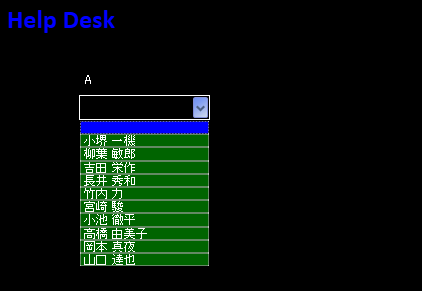
多彩に色を使ったComboBox
クリックすると拡大します
多彩に色を使ったComboBoxのZAMLは下記の通りです。
View
 <ComboBox
	ItemsSource="{Binding StaffListView}"
	SelectedValue="{Binding SelectedValue, Mode=TwoWay}"
	Height="25"
	Margin="81,95,0,0"
	Name="cmbCategory2"
	BorderThickness="1" BorderBrush="White"
	VerticalAlignment="Top"
	HorizontalAlignment="Left"
	Width="131"  SelectedIndex="-1" >
	<ComboBox.Resources>
		<!-- Colour of ComboBoxItem -->
		<SolidColorBrush x:Key="{x:Static SystemColors.WindowBrushKey}" Color="Black" />
		<!-- Mouse over colour of ComboBoxItem -->
		<SolidColorBrush x:Key="{x:Static SystemColors.HighlightBrushKey}" Color="Blue" />
	</ComboBox.Resources>
	<ComboBox.ItemContainerStyle>
		<Style TargetType="ComboBoxItem">
		<Setter Property="Background" Value="DarkGreen"/>
		<Setter Property="BorderThickness" Value="0.6"/>
		<Setter Property="BorderBrush" Value="White"/>
		</Style>
	</ComboBox.ItemContainerStyle>
</ComboBox>
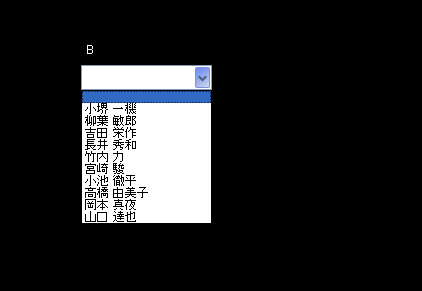
標準のComboBox
クリックすると拡大します
標準のComboBoxのZAMLは下記の通りです。
View
 <ComboBox
	ItemsSource="{Binding StaffListView}"
	SelectedValue="{Binding SelectedValue, Mode=TwoWay}"
	Height="25"
	Margin="81,320,0,0"
	Name="cmbCategory"
	VerticalAlignment="Top"
	HorizontalAlignment="Left"
	Width="131"  SelectedIndex="-1" />
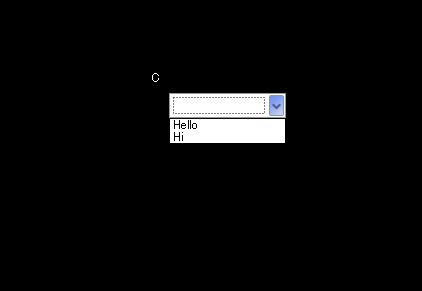
固定値のComboBox
クリックすると拡大します
固定値のComboBoxのZAMLは下記の通りです。
View
 <ComboBox vm:xComboUtil.AllowNull="true" Margin="0,95,362,0"
	Height="25"  Background="White"
	VerticalAlignment="Top"
	HorizontalAlignment="Right" Width="117">
	<ComboBoxItem>Hello</ComboBoxItem>
	<ComboBoxItem>Hi</ComboBoxItem>
</ComboBox>
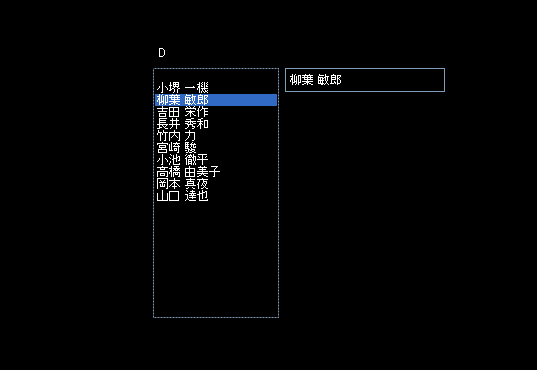
Backgroundを黒にしたListBox
クリックすると拡大します
Backgroundを黒にしたListBoxのZAMLは下記の通りです。
View
 <ListBox  Name="listBox1"
	ItemsSource="{Binding StaffListView}"
	Margin="534,320,0,0" HorizontalAlignment="Left"  VerticalAlignment="Top"
	Foreground="White" Background="Black"  Width="126" Height="250">
</ListBox>
全部ZAMLを下記に示します。
View
<ccl:CustomChromeWindow
        x:Class="LivetWPFChromeHelpDesk1.Views.Window7"
        xmlns="http://schemas.microsoft.com/winfx/2006/xaml/presentation"
        xmlns:x="http://schemas.microsoft.com/winfx/2006/xaml"
        xmlns:shell="http://schemas.microsoft.com/winfx/2006/xaml/presentation/shell"
        xmlns:ccl="clr-namespace:CustomChromeLibrary;assembly=CustomChromeLibrary"
        xmlns:i="http://schemas.microsoft.com/expression/2010/interactivity"
        xmlns:ei="http://schemas.microsoft.com/expression/2010/interactions"
        xmlns:l="http://schemas.livet-mvvm.net/2011/wpf"
        xmlns:core="clr-namespace:Microsoft.Expression.Interactivity.Core;assembly=Microsoft.Expression.Interactions"
        xmlns:v="clr-namespace:LivetWPFChromeHelpDesk1.Views"
        xmlns:vm="clr-namespace:LivetWPFChromeHelpDesk1.ViewModels"
        WindowStartupLocation="CenterScreen"
        Title="Window7" Height="714" Width="1035">

    <shell:WindowChrome.WindowChrome>
        <shell:WindowChrome
            ResizeBorderThickness="6"
            CaptionHeight="43"
            CornerRadius="0,0,0,0"
            GlassFrameThickness="0">
        </shell:WindowChrome>
    </shell:WindowChrome.WindowChrome>

    <Window.Resources>
        <ResourceDictionary>
            <vm:XComboBoxEmptyItemConverter x:Key="XComboBoxEmptyItemConverter"/>
            <ResourceDictionary.MergedDictionaries>
                <ResourceDictionary Source="/Resources/Styles.xaml"/>
                <ResourceDictionary Source="/Resources/Styles2.xaml"/>
                <ResourceDictionary Source="/Resources/StylesBG.xaml"/>
            </ResourceDictionary.MergedDictionaries>
        </ResourceDictionary>
    </Window.Resources>

    <Window.DataContext>
        <vm:ViewModel7/>
    </Window.DataContext>

    <i:Interaction.Triggers>

        <l:InteractionMessageTrigger
            MessageKey="MessageKey20" Messenger="{Binding Messenger}">
            <l:TransitionInteractionMessageAction
                WindowType="{x:Type v:Window20}" Mode="Modal"/>
        </l:InteractionMessageTrigger>

        <l:InteractionMessageTrigger
            MessageKey="MessageKey21" Messenger="{Binding Messenger}">
            <l:TransitionInteractionMessageAction
                WindowType="{x:Type v:Window20}" Mode="Modal"/>
        </l:InteractionMessageTrigger>

        <!--WindowのContentRenderedイベントのタイミングでViewModelのInitializeメソッドが呼ばれます-->
        <!--
        <i:EventTrigger EventName="ContentRendered">
            <l:LivetCallMethodAction MethodTarget="{Binding}" MethodName="Initialize"/>
        </i:EventTrigger>
-->
        <!-- 下記がないと、タスクバーが1つにならない -->
        <i:EventTrigger EventName="Loaded">
            <i:InvokeCommandAction Command="{Binding Path=Loaded}"
                                   CommandParameter="{Binding Mode=OneTime,RelativeSource={RelativeSource Mode=FindAncestor,AncestorType={x:Type Window}}}"/>
        </i:EventTrigger>

        <!--  Activatedを設定する -->
        <i:EventTrigger EventName="Activated" >
            <i:InvokeCommandAction Command="{Binding Activated}" />
        </i:EventTrigger>

        <!--
        <i:EventTrigger EventName="Closing">
            <i:InvokeCommandAction Command="{Binding Path=Closing}"
                                   CommandParameter="{Binding Mode=OneTime,RelativeSource={RelativeSource Mode=FindAncestor,AncestorType={x:Type Window}}}"/>
        </i:EventTrigger>

        <l:InteractionMessageTrigger MessageKey="Close" Messenger="{Binding Messenger}">
            <l:WindowInteractionMessageAction/>
        </l:InteractionMessageTrigger>
-->
    </i:Interaction.Triggers>

    <!-- Grid-1 -->
    <Grid>

        <!-- WindowChrome Start  -->
        <Border  Grid.RowSpan="2" BorderThickness="3" BorderBrush="Black">
            <Border.Background>
                <LinearGradientBrush StartPoint="0.5,0" EndPoint="0.5,1">
                    <GradientStop Color="Black" Offset="0" />
                    <GradientStop Color="Black" Offset="1" />
                </LinearGradientBrush>
            </Border.Background>
        </Border>

        <Border  BorderThickness="3,3,3,1" BorderBrush="Black" Margin="{Binding Path=CaptionButtonMargin}">
            <Border.Background>
                <LinearGradientBrush StartPoint="0.5,0" EndPoint="0.5,1">
                    <GradientStop Color="Black" Offset="0" />
                    <GradientStop Color="Black" Offset="1" />
                </LinearGradientBrush>
            </Border.Background>
            <!--Window Icon and Title-->
            <StackPanel Orientation="Horizontal" Margin="0" VerticalAlignment="Top">
                <TextBlock Text=" Help Desk" FontFamily="Calibri" FontWeight="Bold" FontSize="26" Foreground="Blue" />
            </StackPanel>
        </Border>
        <ccl:CaptionButtons />
        <!-- WindowChrome End  -->

        <!-- Grid-2 -->
        <!--Content-->
        <Grid Grid.Row="1">

            <!-- ★★★ -->
            <Grid>
                <TextBox Text="{Binding Path=txt本日}" TextAlignment="Center"
                    Foreground="White" Background="Black"
                    Height="17" HorizontalAlignment="Center"  Name="txt本日"
                    VerticalAlignment="Top" Width="81" Margin="809,3,123,0" />

                <ComboBox
                    ItemsSource="{Binding StaffListView}"
                    SelectedValue="{Binding SelectedValue, Mode=TwoWay}"
                    Height="25"
                    Margin="81,320,0,0"
                    Name="cmbCategory"
                    VerticalAlignment="Top"
                    HorizontalAlignment="Left"
                    Width="131"  SelectedIndex="-1" />

                <ComboBox
                    ItemsSource="{Binding StaffListView}"
                    SelectedValue="{Binding SelectedValue, Mode=TwoWay}"
                    Height="25"
                    Margin="81,95,0,0"
                    Name="cmbCategory2"
                    Foreground="White" Background="Black"
                    BorderThickness="1" BorderBrush="White"
                    VerticalAlignment="Top"
                    HorizontalAlignment="Left"
                    Width="131"  SelectedIndex="-1" >
                    <ComboBox.Resources>
                        <!-- Colour of ComboBoxItem -->
                        <SolidColorBrush x:Key="{x:Static SystemColors.WindowBrushKey}" Color="Black" />
                        <!-- Mouse over colour of ComboBoxItem -->
                        <SolidColorBrush x:Key="{x:Static SystemColors.HighlightBrushKey}" Color="Blue" />
                    </ComboBox.Resources>

                    <ComboBox.ItemContainerStyle>
                        <Style TargetType="ComboBoxItem">
                            <Setter Property="Background" Value="DarkGreen"/>
                            <Setter Property="BorderThickness" Value="0.6"/>
                                <Setter Property="BorderBrush" Value="White"/>
                        </Style>
                    </ComboBox.ItemContainerStyle>
                </ComboBox>

                <ComboBox vm:xComboUtil.AllowNull="true" Margin="0,95,362,0"
                          Height="25"  Background="White"
                          VerticalAlignment="Top"
                          HorizontalAlignment="Right" Width="117">
                    <ComboBoxItem>Hello</ComboBoxItem>
                    <ComboBoxItem>Hi</ComboBoxItem>
                </ComboBox>

                <ListBox  Name="listBox1"
		            ItemsSource="{Binding StaffListView}"
		            Margin="534,320,0,0" HorizontalAlignment="Left"  VerticalAlignment="Top"
                    Foreground="White" Background="Black"  Width="126" Height="250">
                </ListBox>

                <TextBox Text="{Binding Path=txtMessage, Mode=TwoWay}"  VerticalContentAlignment="Center"
                     Foreground="White" Background="Black" Height="24" HorizontalAlignment="Left"
                         Margin="666,320,0,0"  VerticalAlignment="Top" Width="160" />

                <Label Content="A" Foreground="White" Height="20" HorizontalAlignment="Left" Margin="81,69,0,0" Name="label1" VerticalAlignment="Top" Width="24" />
                <Label Content="B" Foreground="White" Height="20" HorizontalAlignment="Left" Margin="81,294,0,0" Name="label2" VerticalAlignment="Top" Width="24" />
                <Label Content="C" Foreground="White" Height="20" HorizontalAlignment="Left" Margin="534,69,0,0" Name="label3" VerticalAlignment="Top" Width="24" />
                <Label Content="D" Foreground="White" Height="20" HorizontalAlignment="Left" Margin="534,294,0,0" Name="label4" VerticalAlignment="Top" Width="24" />
            </Grid>
            <!-- ★★★ -->

        </Grid>
    </Grid>
</ccl:CustomChromeWindow>
ViewModelは下記の通りです。
ViewModel
using System;
using System.Collections.Generic;
using System.Collections.ObjectModel;
using System.Linq;
using System.Text;
using System.ComponentModel;

using Livet;
using Livet.Commands;
using Livet.Messaging;
using Livet.Messaging.IO;
using Livet.EventListeners;
using Livet.Messaging.Windows;

//ICommand
using System.Windows.Input;

using System.Data.OracleClient;

// ListCollectionView
using System.Windows.Data;

//MessageBox
using System.Windows;

using LivetWPFChromeHelpDesk1.Models;
using LivetWPFChromeHelpDesk1.Views;
using LivetWPFChromeHelpDesk1.ViewModels;

//ComboBox
using System.Windows.Controls;

namespace LivetWPFChromeHelpDesk1.ViewModels
{
    class ViewModel7 : ViewModel
    {
        #region 変更通知プロパティ
        //-----------------------------------------------
        //public string txtMessage { get; set; }
        private string _txtMessage;
        public string txtMessage
        {
            get { return _txtMessage; }
            set
            {
                _txtMessage = value;
                RaisePropertyChanged("txtMessage");
            }
        }

        public string txt本日 { get; set; }
        public bool IsEnabled { get; set; }

        private string _SelectedValue;
        public string SelectedValue
        {
            get
            {
                return _SelectedValue;
            }
            set
            {
                if (value == _SelectedValue)
                    return;

                _SelectedValue = value;
                RaisePropertyChanged("SelectedValue");
            }
        }
        #endregion
        //-----------------------------------------------
        Window win = null;
        public ViewModel7()
        {
            Loaded = new Livet.Commands.ListenerCommand<Window>((w) =>
            {
                if (NeedHideOwner && w.Owner != null && w.Owner.Visibility == Visibility.Visible)
                {
                    win = w;
                    //w.Owner.Hide();
                }
            });
            Activated = new Livet.Commands.ListenerCommand<Window>((w) =>
            {
                if (win != null) win.Owner.Hide();

                //★ListCollectionView 5-2
                this.StaffList = new List<string>();
                GetPersonData();

                //★ListCollectionView 5-4
                this.StaffListView = new ListCollectionView(this.StaffList);
                this.StaffListView.CurrentChanged += StaffListView_CurrentChanged;
                //下記のRefreshでListBoxへバインドを実行させます
                this.StaffListView.Refresh();
            });

            //Initialize()では表示されない
            txt本日 = Convert.ToString(DateTime.Today.ToShortDateString());

        }

        public bool NeedHideOwner { get; set; }
        public ICommand Loaded { get; private set; }
        public ICommand Activated { get; private set; }

        #region StaffListView 社員一覧(ComboBox)
        //★ListCollectionView 5-1
        private List<string> StaffList;

        /// <summary>
        /// 社員一覧(ListBox)
        /// </summary>
        private ListCollectionView _StaffListView;
        public ListCollectionView StaffListView
        {
            get
            { return _StaffListView; }
            set
            {
                if (_StaffListView == value)
                    return;
                _StaffListView = value;
                RaisePropertyChanged("StaffListView");
            }
        }

        /// <summary>
        /// リストの位置が変わった
        /// </summary>
        /// <param name="sender"></param>
        /// <param name="e"></param>
        void StaffListView_CurrentChanged(object sender, EventArgs e)
        {
            this.StaffListView.Refresh();
            //
            var lv = sender as ICollectionView;
            if (lv.CurrentPosition < 0)
            {
                System.Diagnostics.Trace.WriteLine("選択無し");
                return;
            }
            txtMessage = lv.CurrentItem as string;
            // 何か処理を記述
         }
        #endregion

        #region Read
        private void Read()
        {

        }
        #endregion

        #region GetDataCommandコマンド
        private ViewModelCommand _getDataCommand;
        public ViewModelCommand GetDataCommand
        {
            get
            {
                if (_getDataCommand == null)
                {
                    _getDataCommand = new ViewModelCommand(GetPersonData);
                }
                return _getDataCommand;
            }
        }

        public void GetPersonData()
        {
            string CmdString = string.Empty;
            using (OracleConnection con = new OracleConnection())
            {
                con.ConnectionString = "User Id=beluran; Password=beluran; Data Source=beluran;Pooling=false;";
                con.Open();
                //
                CmdString = "SELECT 社員姓名 FROM 社員マスター ";


                OracleCommand oracmd = new OracleCommand(CmdString, con);
                OracleDataReader reader = oracmd.ExecuteReader();

                //*** Tran ***
                //tx.Commit();
                int i = 1;
                while (reader.Read() == true)
                {
                    if (i == 1)
                    {
                        this.StaffList.Add("");
                    }
                    this.StaffList.Add(reader["社員姓名"].ToString());
                    i++;
                }
            }
        }
        #endregion

        #region isTextBoxVisible
        private bool isTextBoxVisible;
        public bool IsTextBoxVisible
        {
            get { return isTextBoxVisible; }
            set
            {
                isTextBoxVisible = value;
                RaisePropertyChanged("IsTextBoxVisible");
            }
        }
        #endregion

        #region GotoCommand
        //---------------------------------------------------------------
        public ViewModelCommand GotoCommand2
        {
            get { return new Livet.Commands.ViewModelCommand(Goto2); }
        }
        public void Goto2()
        {
            Messenger.Raise(new TransitionMessage(new ViewModel2() { NeedHideOwner = true }, "MessageKey2"));
        }
        //----------------------------------------------------------------
        #endregion

        #region ActivatedCommand
        public ICommand ActivatedCommand
        {
            get { return new DelegateCommand<object>(Handle); }
        }
        public void Handle(object o)
        {

            txtMessage = "5555555555555555";
        }
        #endregion

        #region CloseCommand
        private ViewModelCommand _CloseCommand;
        public ViewModelCommand CloseCommand
        {
            get
            {
                if (_CloseCommand == null)
                {
                    _CloseCommand = new ViewModelCommand(Close);
                }
                return _CloseCommand;
            }
        }
        public void Close()
        {
            var window = Application.Current.Windows.OfType<Window>().SingleOrDefault((w) => w.IsActive);
            window.Close();
        }
        #endregion
    }
}